DLC and Ownership
SteamCore PRO can list your game's DLC, check which DLC the player owns and has installed, install optional DLC and open a DLC's store page.
Prerequisites
- Your own Steam App ID, see Using Your Own App ID.
- Each DLC created on the Steamworks partner site, with its own App ID.
Listing the DLC
Get DLC Count returns how many DLC your game has. Call BGet DLC Data by Index with an index from 0 to the count minus one to get each DLC's:
| Output | Description |
|---|---|
| App ID | The DLC's App ID. |
| Available | True if the DLC has a store page the player can see. |
| Name | The DLC's name. |
Checking Ownership
| Node | Returns true when |
|---|---|
| BIs Dlc Installed | The player owns the DLC and it is installed. Use this before you load DLC content. |
| BIs Subscribed App | The player owns the app, installed or not. Works for DLC App IDs and for other games, for example a demo. |
Ownership can change while the game runs, for example when the player buys a DLC in the overlay. Check again when DLC Installed fires instead of only at start.
Installing and Removing DLC
DLC that is set to optional in Steamworks is not downloaded with the game. Install DLC asks Steam to download a DLC the player owns, and Uninstall DLC removes it. Get Dlc Download Progress returns the bytes downloaded so far.
When a DLC finishes installing, DLC Installed fires on Get Steam Apps with the DLC's App ID. Your game then has to load the new content itself, for example by mounting its pak file.
Selling DLC in the Overlay
If the player does not own the DLC, open its store page with Activate Game Overlay to Store. The Flag can add the DLC to the player's cart (Add to Cart) or add it and show the cart (Add to Cart and Show). See Steam Overlay.
Example
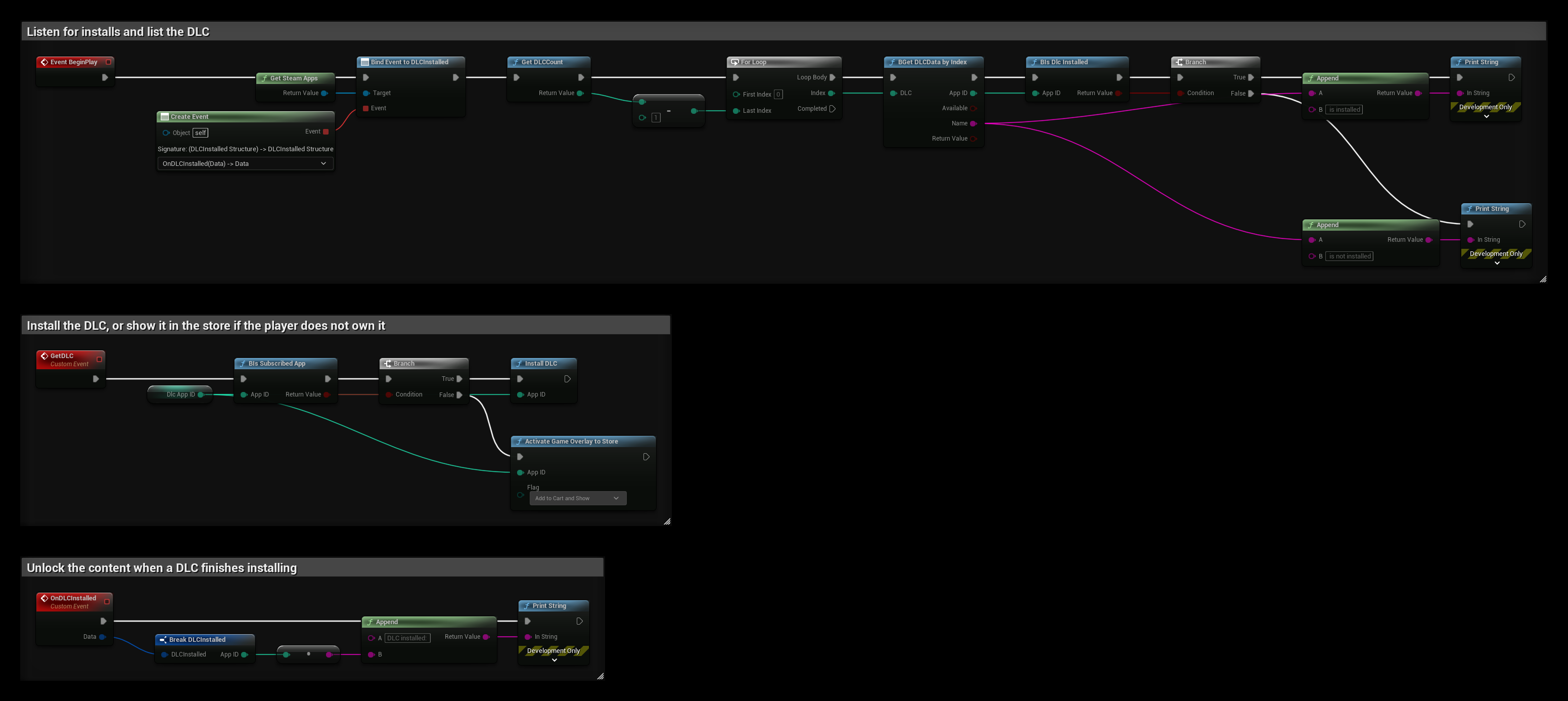
DlcAppID is an Integer variable with your DLC's App ID:
- BeginPlay binds DLC Installed, then loops over all DLC and prints whether each one is installed.
- GetDLC installs the DLC if the player owns it, and opens its store page with the DLC in the cart if not.
- OnDLCInstalled prints the App ID of a DLC that finished installing. Unlock or load its content here.
Beta Branches and Launch Parameters
Other nodes on Get Steam Apps that are useful with DLC and updates:
- Get Current Beta Name returns the name of the beta branch the player runs, or false on the default branch.
- Get Launch Query Param and Get Launch Command Line read parameters from a
steam://runlink. New Url Launch Parameters Delegate fires when the game is started again with new ones.