Logging In to Your Own Backend
If your game has its own server or web service, for example for accounts, matchmaking or a shop, the server needs to know which Steam player is calling it. The game cannot simply send its Steam ID, since anyone can send any Steam ID. Instead, the game asks Steam for a ticket, sends it to your server, and the server asks Steam who the ticket belongs to.
This page is about your own backend. To check players who join an Unreal dedicated server, see Authenticating Steam Users.
Prerequisites
- Your own Steam App ID, see Using Your Own App ID.
- A Publisher Web API Key for your server, from Users & Permissions → Manage Groups on the Steamworks partner site. Keep it on the server, never in the game.
Web API Tickets
In the Game
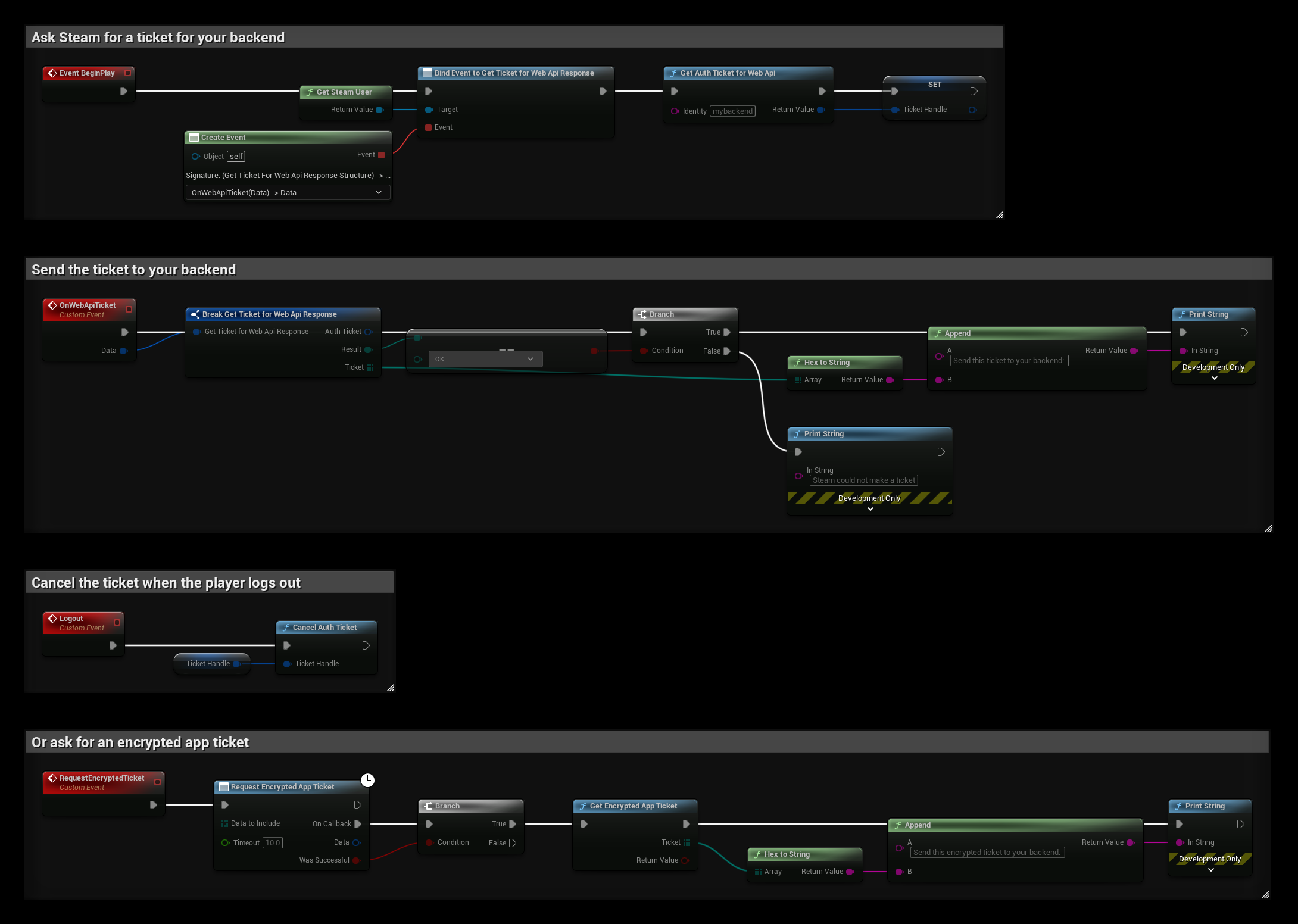
- Use Get Steam User and bind Get Ticket for Web Api Response.
- Call Get Auth Ticket for Web Api with an Identity, a name for your server such as
mybackend. Keep the Return Value, the ticket handle. - When Get Ticket for Web Api Response fires with Result OK, turn Ticket into text with Hex to String and send it to your server, for example in a login request.
- When the player logs out, call Cancel Auth Ticket with the ticket handle.
On the Server
Your server calls Steam's AuthenticateUserTicket Web API with your Publisher Web API Key, your App ID, the ticket and the same identity. Steam answers with the player's steamid, and also ownersteamid, which differs from it when the game is borrowed through Family Sharing, and whether the player is VAC or publisher banned.
The server now knows the player's Steam ID and can give the game its own session token.
With the SteamCore::Web plugin, a server built with Unreal can call Authenticate User Ticket from Blueprints.
Encrypted App Tickets
An encrypted app ticket can be checked by your server without calling Steam, and can carry a few bytes of your own data. The server decrypts it with your Encrypted App Ticket Key from the Steamworks partner site and the sdkencryptedappticket library in the Steamworks SDK.
- Call Request Encrypted App Ticket. Data to Include is optional data that is put in the ticket.
- If Was Successful is true, call Get Encrypted App Ticket and send the Ticket to your server.
Only one request can be pending at a time, and Steam allows one request per minute.
Example
TicketHandle is a Steam Ticket Handle variable:
- BeginPlay binds Get Ticket for Web Api Response and asks for a Web API ticket.
- OnWebApiTicket turns the ticket into text if Steam made it. Send that text to your backend instead of printing it.
- Logout cancels the ticket.
- RequestEncryptedTicket asks for an encrypted app ticket and turns it into text.