Leaving a Session or Server
This guide explains how to disconnect a client from a multiplayer session or dedicated server in Unreal Engine using SteamCore PRO. The primary method involves using the Destroy Session node to cleanly exit a session. This is essential for ensuring proper cleanup of session data and a smooth player experience.
Using the Destroy Session Node
The Destroy Session node is used to disconnect a client from a multiplayer session or server. This node ensures that the session is properly terminated on the client side, freeing up resources and notifying the server.
Steps
-
Add the Destroy Session Node:
- In your client-side game logic (e.g., Game Instance, Player Controller, or Menu Blueprint), add the Destroy Session node.
- This node is typically executed when the player chooses to leave the session (e.g., via a "Leave Game" button in the UI).
-
Execute the Node:
- Connect the Destroy Session node to the appropriate trigger in your game logic (e.g., a UI button press or game event).
- The node will handle the disconnection process, cleaning up the session data and notifying the server.
-
Handle Post-Disconnection Logic:
- After executing the Destroy Session node, redirect the player to a main menu, lobby, or another level as needed.
- Optionally, display a confirmation message to the player indicating they have left the session.
Example
The following Blueprint demonstrates how to leave a session using the Destroy Session node, triggered by a player action (e.g., clicking a "Leave Game" button).
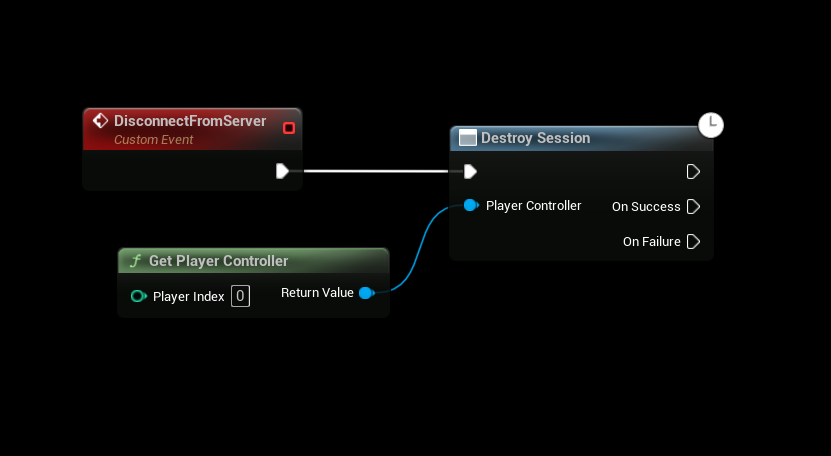
Steps in Blueprint
- Add a trigger event (e.g., a button press in your UI).
- Connect the event to the Destroy Session node.